On this page12 sections
- What Is an LMS for a Learning Center?
- Question 1: Does It Run Batches, or Only Self-Paced Courses?
- Question 2: Can It Handle the Classes You Teach in a Room?
- Question 3: Can It Track Fees, Instalments and What Is Still Owed?
- Question 4: How Deep Does the Assessment Side Go?
- Question 5: Who Else Needs to See Progress?
- Question 6: What Can Each Teacher and Branch See?
- Question 7: What Happens If You Decide to Leave?
- LMS Evaluation Checklist for a Learning Center
- How Should You Run the Demo?
- Common Mistakes Learning Centers Make When Choosing an LMS
- Choosing a Platform You Will Still Want in Three Years
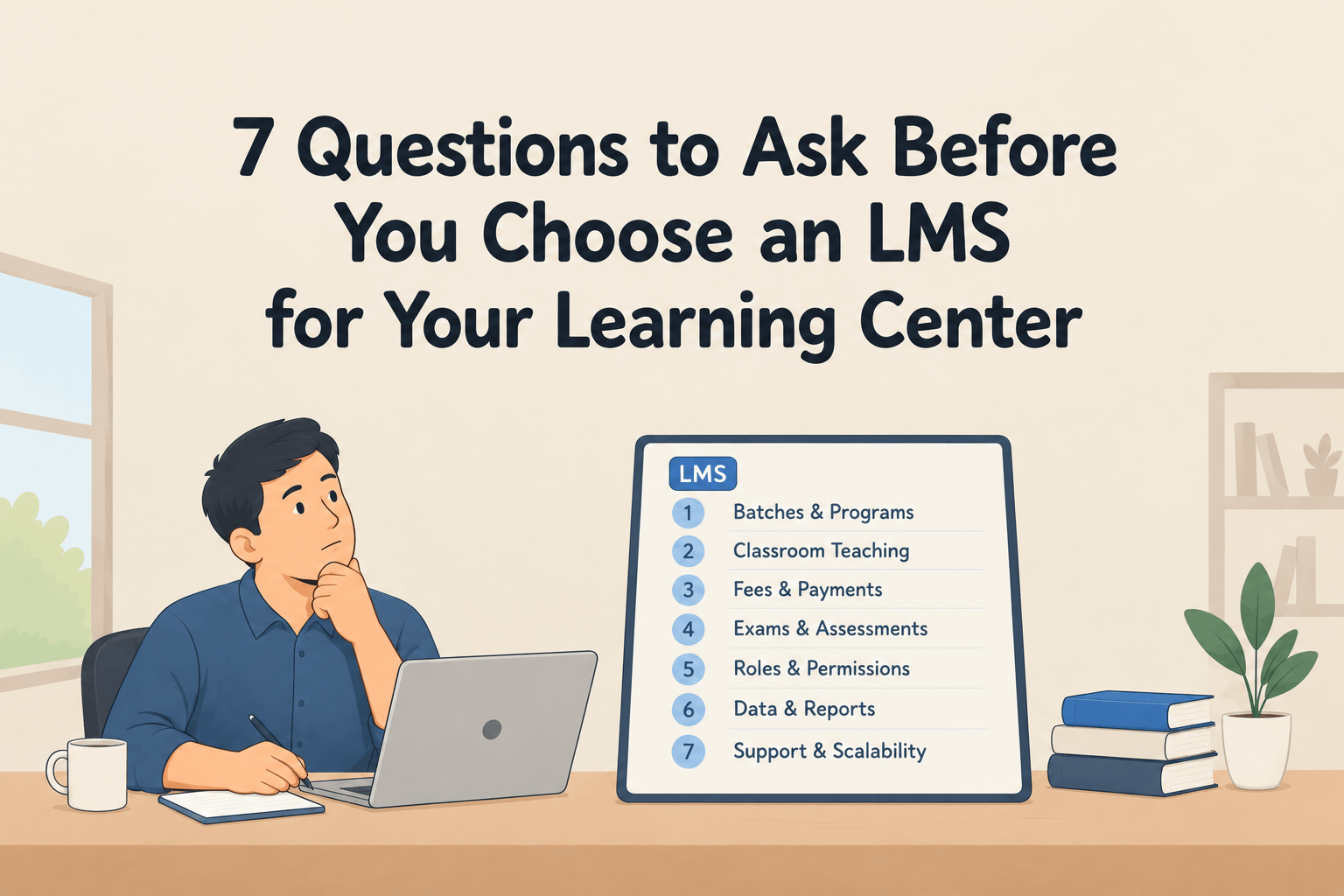
Most learning management systems were built to sell one course to one person. A learning center works differently. You teach in batches that start on a date, you take classes in a room as well as online, you collect fees in parts, and somebody who is not the student wants to know how it is going. The seven questions below are the ones that tell you whether a platform fits that work or only looks good in a demo.
What Is an LMS for a Learning Center?
An LMS for a learning center is a platform that delivers courses and assessments and also runs the operations around them: batches, enrolment, attendance, fees and reporting to whoever is paying.
That second half is where most evaluations go wrong. The term LMS covers a narrower job than learning centers assume, and three categories of software overlap here.
| System | Built to do | Where a learning center hits the gap |
|---|---|---|
| Learning management system (LMS) | Deliver lessons, run assessments, track progress | Fees, attendance, scheduling, instructor pay |
| Training management system (TMS) | Schedule sessions, manage seats and bookings, invoice | Course content, assessment depth, learner experience |
| Student information system (SIS) | Store student records, enrolment and academic history | Teaching, content delivery, day to day learning |
A tutoring center, a language school, a test-prep institute and a coding bootcamp all need parts of all three. If you ask vendors only about LMS features, you will shortlist platforms that handle your content well and leave your office staff running the rest on spreadsheets. The types of learning management systems differ enough that this is worth settling before any demo.
Question 1: Does It Run Batches, or Only Self-Paced Courses?
A learning center teaches groups. Twenty students start in March, follow a schedule, finish in June, and a new group starts in July with the same material. Most course platforms have no concept of that group at all.
Ask the vendor:
- Are a course and a batch separate things, or does each new group need its own course?
- Can you set a start date, an end date and a weekly schedule?
- Can a student move from one batch to another without losing their records?
- Can you enrol thirty students at once instead of one by one?
A good answer sounds like this: build the course once, then run it as many times as you like. Cohort management and bulk enrolment should be ordinary parts of the product, not something the vendor describes as a workaround. If the course content needs to unlock week by week, ask about drip content and learning paths in the same conversation.
The warning sign is a vendor who tells you to duplicate the course for every new group. Three terms later your dashboard holds forty near-identical courses, nobody is sure which one is current, and reporting across them is manual.
Question 2: Can It Handle the Classes You Teach in a Room?
Plenty of learning centers want software for everything except the teaching, which still happens face to face. The platform has to hold notes, recordings, attendance, results and payments for a student who walks through the door and never watches a video.
Ask the vendor:
- Can you enrol a classroom student without forcing them to buy an online course?
- Can a staff member mark a physical class present or absent?
- Can recordings be released to one batch only?
- Does it connect to Zoom, Google Meet or Teams for the sessions you do run online?
What you want is one student profile that works whether they learn in the room, online, or both. Live classes, recorded lessons and workshops should sit on the same record as everything else.
Watch for attendance that turns out to mean video watch time. A report saying a student completed 60% of a lesson does not tell you they were in the room on Tuesday, and for most learning centers the second fact matters more.
Question 3: Can It Track Fees, Instalments and What Is Still Owed?
Learning centers rarely take the full amount once. Monthly fees, instalments, deposits, early-bird discounts, family discounts, scholarships, some payments made at the desk and some invoiced to an employer. This is the part of the job that actually consumes staff time, and it is the part most LMS demos skip.
Ask the vendor:
- Can you set up an instalment plan or a monthly fee?
- Can a payment taken at the desk be recorded so it lands in the same ledger as an online one?
- Do reminders for unpaid balances go out automatically?
- Is there a report showing outstanding balances for a whole batch?
- Can you issue receipts and invoices?
Then ask for something specific: show me a student who paid half. The screen that comes up tells you whether the product understands part payments or whether somebody will be tracking them in a spreadsheet by month two. If you also sell one-to-one sessions, check how class bookings and payment connect, and read the pricing page of any vendor you shortlist with the same scepticism.
Question 4: How Deep Does the Assessment Side Go?
There is a long distance between a platform that has quizzes and a platform that can run your whole examination process. For test-prep centers, certification bodies and skills institutes, that process is the product.
Ask the vendor:
- Is there a question bank, or does every test start from an empty page?
- Can you set time limits, randomise questions and allow retakes?
- Can written work and projects be graded by a person against a rubric?
- Can marks from a paper exam be entered into the system?
- Can you see results for a whole batch at once, or only student by student?
The question bank is the one that pays off. Writing questions is slow, and a platform that lets you reuse them across terms saves more hours over a year than almost any other feature. Look at how assessments and exams, assignments and quizzes and assessment results fit together before you judge this.
Be careful with platforms that only auto-grade multiple choice. If your teachers mark essays, code or recordings, human grading cannot be an afterthought.
Question 5: Who Else Needs to See Progress?
A learning center almost always has a third party. A parent, an employer paying for staff training, a sponsor, an agency. They did not take the course and they decide whether next year gets funded.
Ask the vendor:
- Can a parent, guardian or sponsor get their own login?
- Do attendance, results and balance notices go out on their own?
- Which channels are supported, and who pays for them?
- Can the interface and the messages be shown in your students' language?
Automatic beats manual here. Notifications and announcements that fire on an event will keep working in a busy week. A report somebody has to remember to send will not. If parents or sponsors log in themselves, check what the student panel, progress tracking and completion reports show them, and ask about multi-language support if you teach across languages.
Question 6: What Can Each Teacher and Branch See?
Giving a part-time teacher access to the lesson content, and accidentally giving them the revenue figures, is a common and expensive mistake.
Ask the vendor:
- How many distinct roles exist, and can you adjust what each one sees?
- Can a teacher be limited to their own batches?
- Does the platform support more than one location?
- Can you report across all branches while keeping their data separate?
- Can instructor hours or revenue share be calculated in the system?
Two roles is not enough. If the only options are administrator and student, every teacher you hire becomes an administrator, and your financial data is one click away from somebody who only needed a reading list. Check role permissions, access control and instructor management, and look at what the educator panel actually exposes.
Question 7: What Happens If You Decide to Leave?
This is the least asked and most valuable question in the evaluation. You are choosing something you will live with for years, and the exit terms tell you how the vendor behaves while you stay.
Ask the vendor:
- Is pricing charged per student, so growing costs you more?
- Can you export student records, course content, question banks and payment history, or only a summary?
- Can you run it on your own domain and under your own name?
- If you later want to sell recorded courses, does that happen in the same place?
- Where is student data stored, and under which rules?
A vendor who answers the export question plainly expects to keep you by being useful. One who changes the subject has told you something. Also check that your own brand survives: website builder and your own domain matter more than they look, because every year of marketing you do should build your name rather than theirs. If you run other tools already, go through the integrations list before you assume anything connects, and ask whether there is an audit trail of who changed what.
LMS Evaluation Checklist for a Learning Center
Take this into the demo and score each platform out of two: it does this properly, it half does it, or it does not.
| Requirement | Why it matters |
|---|---|
| Batches separate from courses | You teach the same course many times |
| Schedule and routine | Your students come on fixed days |
| Attendance for in-person classes | Your teaching is not only video |
| Instalments and part payments | Fees arrive in pieces |
| Payments recorded at the desk | Not every student pays online |
| Outstanding balance report | Somebody has to chase it |
| Question bank | Writing questions is your slowest task |
| Human grading with rubrics | Essays and projects need a marker |
| Parent or sponsor access | They decide on renewal |
| Automatic notifications | Manual sending stops in a busy week |
| Role-based permissions | Teachers should not see revenue |
| Multi-branch reporting | One view across locations |
| Full data export | Your records stay yours |
| Your own domain and branding | Your marketing builds your name |
If you want the general version of this exercise, with pricing models, security and integrations covered in more depth, the LMS buying guide walks through the whole selection process for any organisation.
How Should You Run the Demo?
Do not let the vendor drive. A scripted demo shows you the happy path, and the happy path is never where learning centers get stuck.
Send three tasks in advance and ask them to perform the tasks live:
- Enrol a student into a batch that has already started, and show their record.
- Show a student who has paid part of their fee, then show the outstanding balance for the whole batch.
- Log in as a teacher and show what that teacher cannot see.
Any platform can pass a feature checklist. Few pass all three of those without a pause. For a sense of what good looks like from the other side of the screen, our notes on building a user-friendly LMS cover the usability tests worth running with your own staff.
Common Mistakes Learning Centers Make When Choosing an LMS
Buying on content features alone. The course builder is the part you will use least often after the first month. The enrolment, attendance and fee screens are the ones your staff open every day.
Treating price as the comparison. A cheaper platform that cannot record a part payment costs you an administrator's afternoon every week, and that is more expensive than the difference in subscription within a term.
Testing with clean sample data. Load twenty real students, two real batches and one messy payment history. Products behave differently once the data is yours.
Skipping the people who will use it. The teacher who marks forty scripts a week and the person at the front desk know within ten minutes whether a platform will work. Ask them before you sign, not after.
Forgetting that you will grow. Ask what happens at three times your current enrolment, in cost and in administration, before the answer becomes your problem.
Choosing a Platform You Will Still Want in Three Years
The seven questions above share a shape. Each one asks the vendor to show you the ordinary, unglamorous middle of your week rather than the launch day. Batches that run again. A fee that arrived in two parts. A teacher who should see one class and not the accounts. A parent who wants to know if their child turned up.
Platforms are easy to compare on features and hard to compare on fit. The fastest way to tell them apart is to stop asking what the software can do and start asking it to do your work in front of you. If you want a wider view of what these systems are for before you shortlist, start with what an LMS means, then look at how Edushade handles this for tutors, academies and training teams.