On this page18 sections
- How Does an LMS Work?
- What Is an LMS?
- How Does a Learning Management System Work Step by Step?
- 1. Course Creators Build Learning Content
- 2. Learners Are Added and Given Access
- 3. The LMS Delivers Lessons Through a Digital Platform
- 4. The LMS Tracks Progress and Performance
- 5. Instructors Use Reports to Improve Learning
- What Are the Main Components of an LMS?
- How Does an LMS Help Teachers and Course Creators?
- How Do Schools, Universities, and Training Businesses Use an LMS?
- What Are the Benefits of Using an LMS?
- What Features Should You Look for in an LMS?
- LMS vs Traditional Learning: What Is the Difference?
- What Are the Limitations of an LMS?
- Is an LMS Right for Your Organization?
- How Edushade Fits Into Modern Learning Management
- Build Better Learning Experiences With the Right LMS Approach
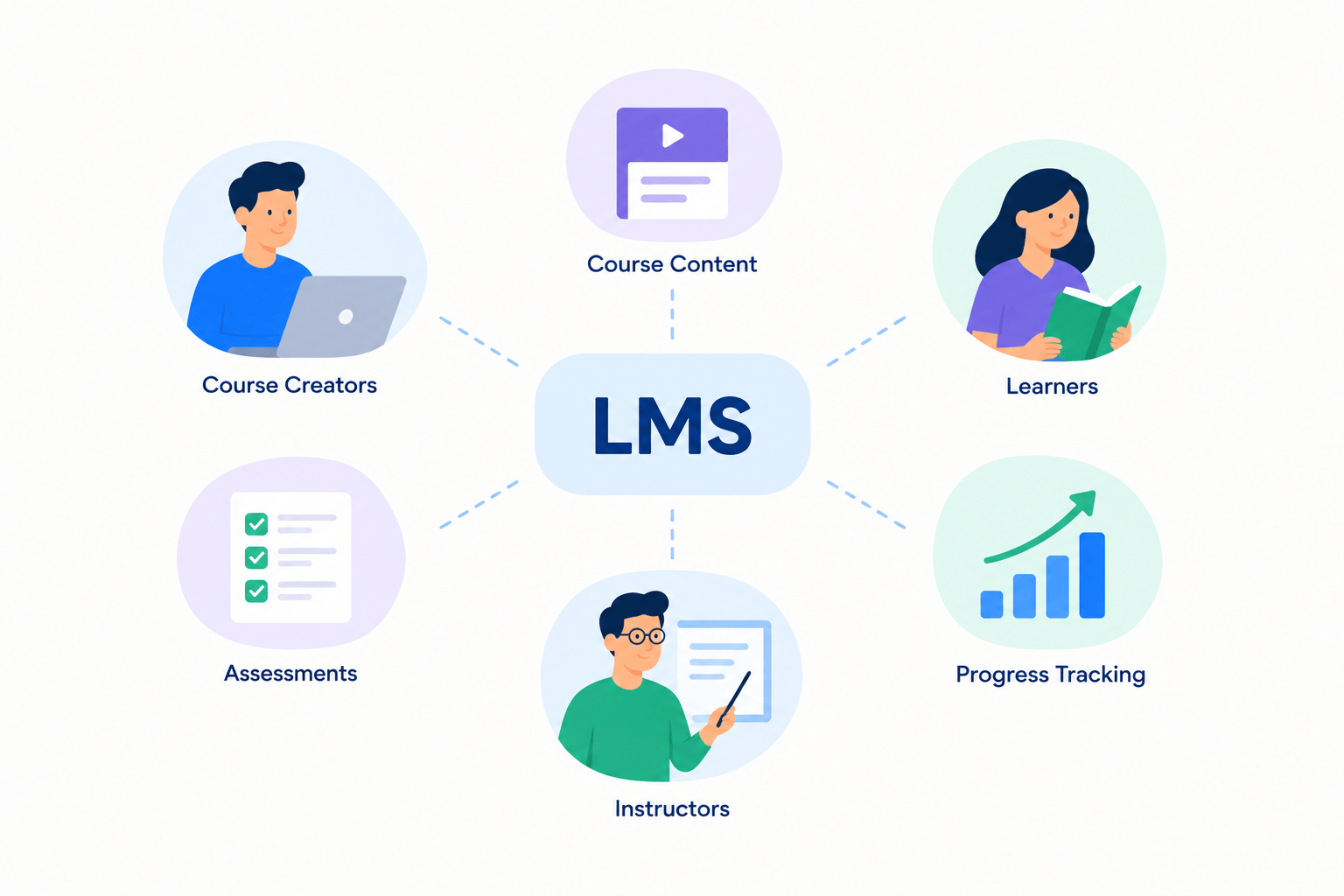
A Learning Management System (LMS) works by bringing courses, learners, instructors, assessments, and progress tracking into one digital platform. It helps educators and organizations create courses, deliver lessons, manage learners, and measure results. Instead of handling everything manually, an LMS creates a structured online learning environment that makes teaching and training easier to manage.
How Does an LMS Work?
A learning management system works by connecting the main parts of the learning process: course creation, content delivery, learner participation, assessment, and reporting. Instructors create and organize learning materials, students access those materials, and administrators monitor progress through the platform.
Think of an LMS as a digital classroom combined with a management system. A teacher can upload lessons, assign activities, review results, and communicate with learners. A business can use the same type of system to train employees, track completion, and manage learning programs.
An LMS does not replace teachers or trainers. Instead, it gives them tools to organize knowledge, reduce repetitive administrative work, and create a more consistent learning experience.
What Is an LMS?
An LMS, short for learning management system, is software used to create, deliver, manage, and track online learning. It provides a central location where instructors, learners, and administrators can interact with educational content.
In simple terms, an LMS helps answer four important questions:
- What should learners study?
- How will they access the content?
- How will their progress be measured?
- How can instructors improve the learning experience?
Schools, universities, online course creators, tutors, coaches, and businesses use LMS platforms for different learning needs. A university may use an LMS to support classroom teaching, while a training company may use one to deliver professional development programs.
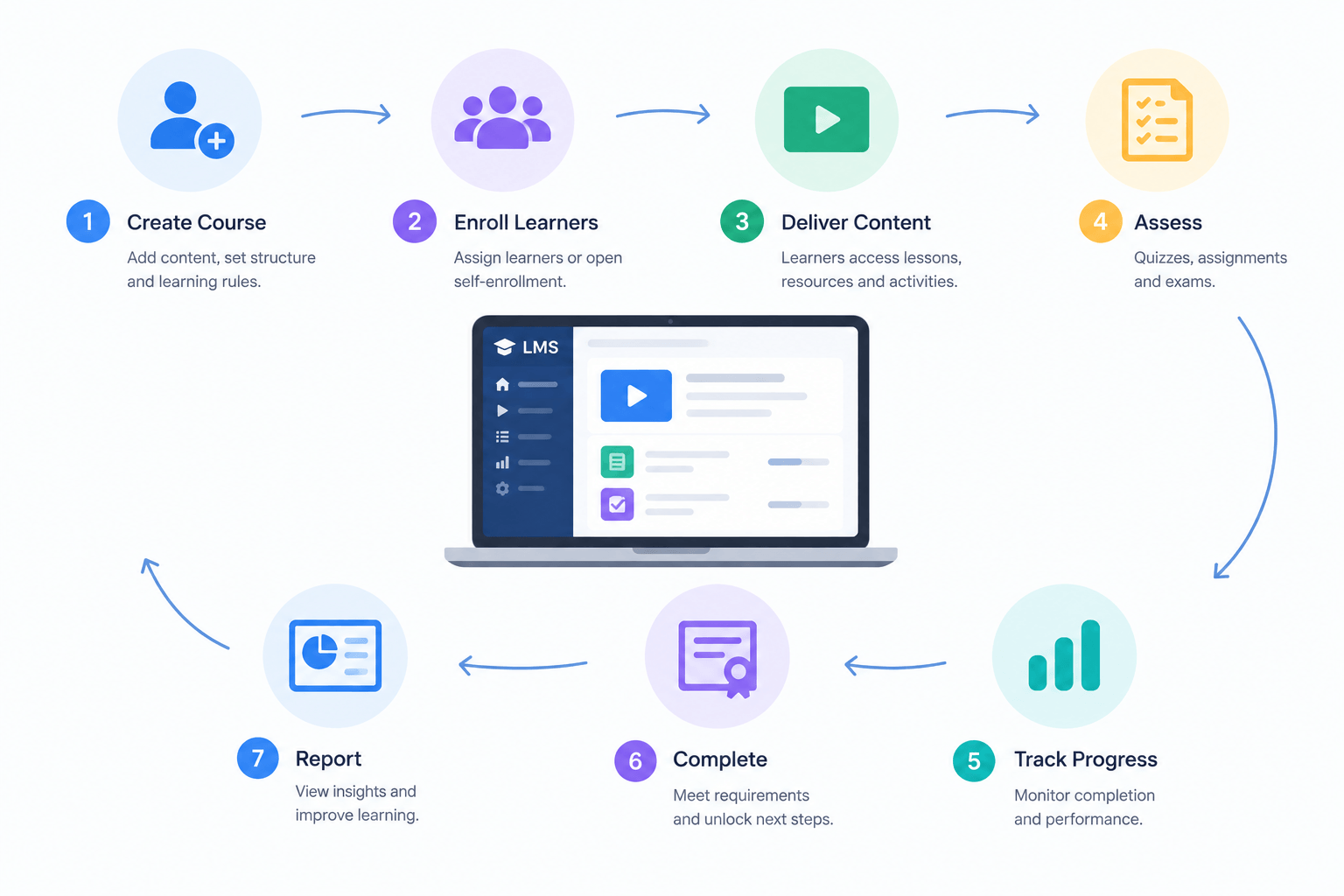
How Does a Learning Management System Work Step by Step?
Most LMS platforms follow a similar workflow, although features vary depending on the software provider and use case.
1. Course Creators Build Learning Content
The first step is creating a course inside the LMS. Instructors can organize lessons into modules and add resources such as videos, documents, presentations, quizzes, assignments, and other learning materials.
For example, an online coach could create a six-week business course with weekly lessons, downloadable resources, and assessments. Learners can then follow the course structure instead of searching through separate files or messages.
2. Learners Are Added and Given Access
After courses are created, learners are enrolled in the appropriate programs. Administrators can control access based on roles, groups, subscriptions, or training requirements.
For example, a school may create separate learning spaces for different classes, while a company may assign specific training courses to different teams.
This user management process helps organizations keep learning content organized and ensures that each learner sees the right materials.
3. The LMS Delivers Lessons Through a Digital Platform
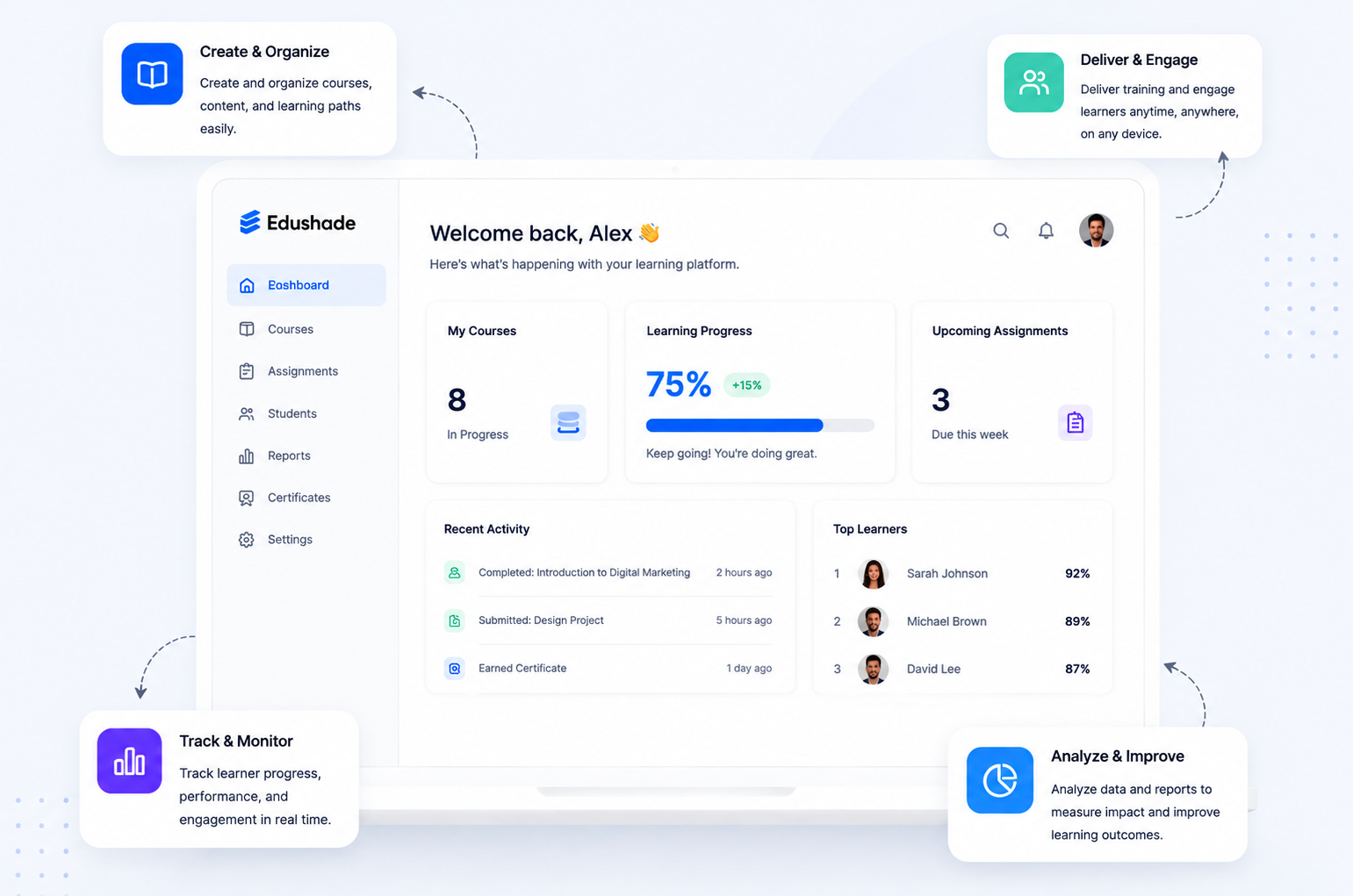
Once learners log in, they can access courses through a learner dashboard. They can view lessons, complete activities, submit assignments, and interact with available learning resources.
A good LMS creates a clear learning path. Instead of asking students to manage multiple tools, files, and communication channels, the platform brings important learning activities together in one place.
4. The LMS Tracks Progress and Performance
One of the most valuable functions of an LMS is tracking learner activity. The system can record information such as:
- Completed lessons
- Quiz results
- Assignment submissions
- Course completion status
- Learner participation
For example, a tutor can identify students who have completed lessons and those who may need additional support. A training manager can check whether employees have completed required courses — see for training teams for what that involves.
5. Instructors Use Reports to Improve Learning
An LMS can provide reports and analytics that help instructors understand learner performance. These insights can show which lessons are completed, where learners may struggle, and how courses are performing.
What Are the Main Components of an LMS?
A typical LMS includes several connected components that support both teaching and administration.
| LMS Component | Purpose |
|---|---|
| Course Management | Creates and organizes lessons and learning materials |
| User Management | Manages instructors, learners, and access permissions |
| Assessment Tools | Creates quizzes, tests, and assignments |
| Progress Tracking | Records learner activity and completion |
| Reporting and Analytics | Provides insights into learning performance |
| Communication Features | Supports interaction between instructors and learners |
The importance of each component depends on the organization using the LMS. A tutor may prioritize course creation and learner communication, while a university may need advanced administration and reporting tools.
How Does an LMS Help Teachers and Course Creators?
An LMS helps teachers by making course organization, assessment, and learner management easier. Instead of storing materials across different platforms, educators can create a structured learning environment in one place.
For course creators, an LMS provides a way to turn expertise into organized online programs. A subject expert, coach, or consultant can create lessons, add activities, and guide learners through a complete learning journey.
For educators exploring digital learning, Edushade is one option for building and managing online learning experiences — its features and the for educators page document the workflow in detail.
How Do Schools, Universities, and Training Businesses Use an LMS?
Schools and universities use LMS platforms to support classroom learning, blended learning, and fully online education. Teachers can share course materials, collect assignments, and provide resources through a centralized system.
Training businesses often use LMS software to deliver structured programs for customers, employees, or professional learners. For example, an academy can organize beginner, intermediate and advanced courses as learning paths while keeping learner records in one place.
The best LMS approach depends on the organization’s goals. A small tutoring business and a large university may both use an LMS, but their feature requirements will be different.
What Are the Benefits of Using an LMS?
An LMS can provide several benefits when it is supported by good course design and teaching practices.
Better Course Organization
An LMS keeps lessons, resources, assessments, and learner information together. This makes courses easier to manage and easier for learners to navigate.
Flexible Learning Access
Many LMS platforms allow learners to access courses remotely, making them useful for online learning, blended education, and distributed teams.
Easier Progress Tracking
Instead of manually checking every learner’s activity, instructors can use LMS reports to understand participation and completion.
More Scalable Training
An LMS allows organizations to deliver learning programs to larger groups without repeating the same administrative tasks for every learner.
What Features Should You Look for in an LMS?
The right LMS depends on your audience, teaching goals, and business requirements. Before choosing an LMS platform, consider these features:
Course Creation Tools
Look for tools that allow you to create lessons, organize modules, upload content, and structure learning paths.
Learner Management
A useful LMS should make it easy to add users, organize groups, and manage course access.
Assessment and Feedback Tools
Quizzes, assignments, and feedback options help instructors measure understanding and support improvement.
Reporting and Analytics
Reports help educators and organizations understand learner activity and identify opportunities to improve courses.
Ease of Use
An LMS should be simple enough for instructors and learners to use without unnecessary complexity.
Scalability
Consider whether the platform can support your future growth as your courses, learners, or training programs expand.
LMS vs Traditional Learning: What Is the Difference?
The main difference between traditional learning and LMS-based learning is how content, communication, and tracking are managed.
| Traditional Learning | LMS-Based Learning |
|---|---|
| Physical classroom materials | Digital learning resources |
| Manual attendance and records | Automated learner tracking |
| Fixed learning schedule | Flexible course access |
| Paper-based assessments | Online quizzes and assignments |
| Limited performance data | Learning analytics and reports |
Traditional teaching remains important, especially where direct interaction is needed. An LMS works best as a tool that supports teachers and improves the learning process.
What Are the Limitations of an LMS?
An LMS can simplify learning management, but it is not a complete solution by itself.
Common limitations include:
- Setting up courses requires planning and effort
- Teachers need time to create quality learning materials
- Learner engagement still depends on good teaching methods
- Organizations may need training before adoption
The technology is only one part of successful learning. A well-designed course and a clear teaching strategy are just as important as the platform itself.
Is an LMS Right for Your Organization?
An LMS may be a good choice if you need to create, deliver, or manage structured learning programs.
An LMS can be useful for:
- Tutors managing multiple students
- Coaches creating online programs
- Schools supporting digital education
- Universities organizing courses
- Training businesses delivering professional learning
Before selecting an LMS, define your goals first. Consider your learners, content type, required features, budget, and future growth plans.
How Edushade Fits Into Modern Learning Management
Choosing an LMS is about creating a smoother learning experience for both instructors and learners. The right platform should help educators organize content, manage learners, and deliver courses effectively.
For educators, academies, tutors, and training businesses exploring online learning, understanding how an LMS works is the first step toward choosing the right solution.
Compare Edushade’s documented features against your own list before you shortlist anything.
Build Better Learning Experiences With the Right LMS Approach
An LMS works by connecting course creation, learner access, assessments, communication, and progress tracking in one organized system. For educators, schools, universities, and training businesses, it provides a practical way to manage learning more effectively.
The next step is to identify what your learners need and which LMS features support your goals. If you want the same cycle explained in more depth — enrollment rules, completion logic, grading and integrations — read how learning management systems work.